
Cloud Infrastructure 101: Why Scalable AWS Architecture Is Non-Negotiable for Growing Businesses

Cloud Infrastructure 101: Why Scalable AWS Architecture Is Non-Negotiable for Growing Businesses
Most businesses don't think about their cloud infrastructure until something breaks — a traffic spike takes the site down, a security gap gets exposed, or a hosting bill triples overnight with no clear explanation. By then, fixing it under pressure costs far more than architecting it correctly from the start.
This guide covers what scalable AWS infrastructure actually means, why it matters even for businesses that aren't "tech companies," and how to know when it's time to move.
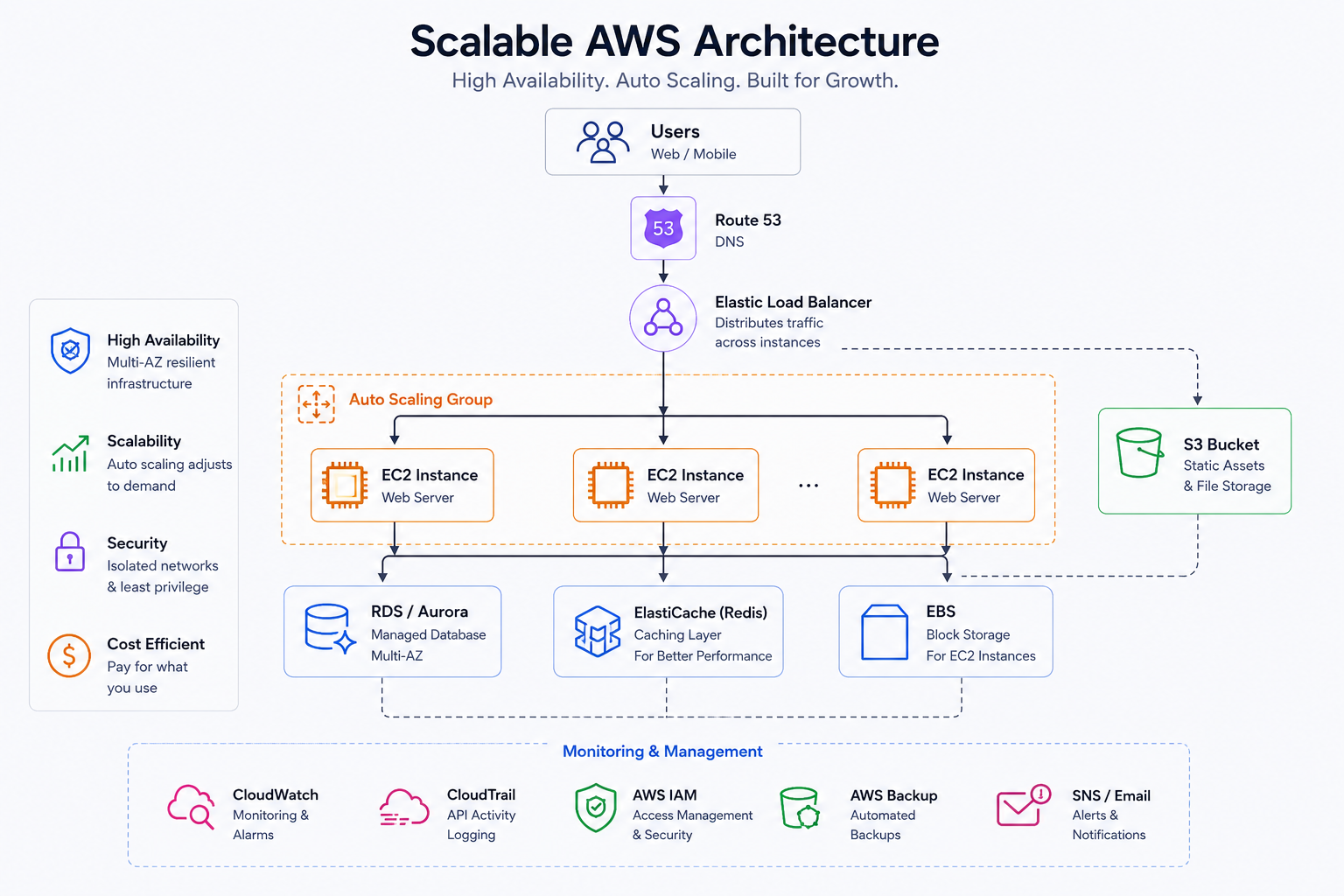
What "Scalable" Actually Means (It's Not Just About Traffic Spikes)
Scalability is often reduced to "can it handle more visitors," but a properly architected cloud environment solves for four things at once:
Elasticity — automatically adding or removing capacity as demand changes, instead of paying for peak capacity around the clock
Reliability — no single point of failure; if one server or availability zone has an issue, the system keeps running
Security — proper network isolation, access controls, and encryption, not a single exposed server holding everything
Cost efficiency — paying for what you actually use, with visibility into where spend is going
A system that only solves for traffic handling but ignores the other three isn't actually scalable — it's just bigger.
Signs Your Current Infrastructure Is Holding You Back
Your hosting costs are unpredictable month to month, with no clear line item breakdown
A single server outage takes your entire product offline
Deploying updates requires manual steps and downtime
You've had a security incident, or you genuinely don't know if your setup would survive one
Your engineering team spends more time managing servers than building product
If any of these sound familiar, the underlying infrastructure — not your application code — is usually the bottleneck.
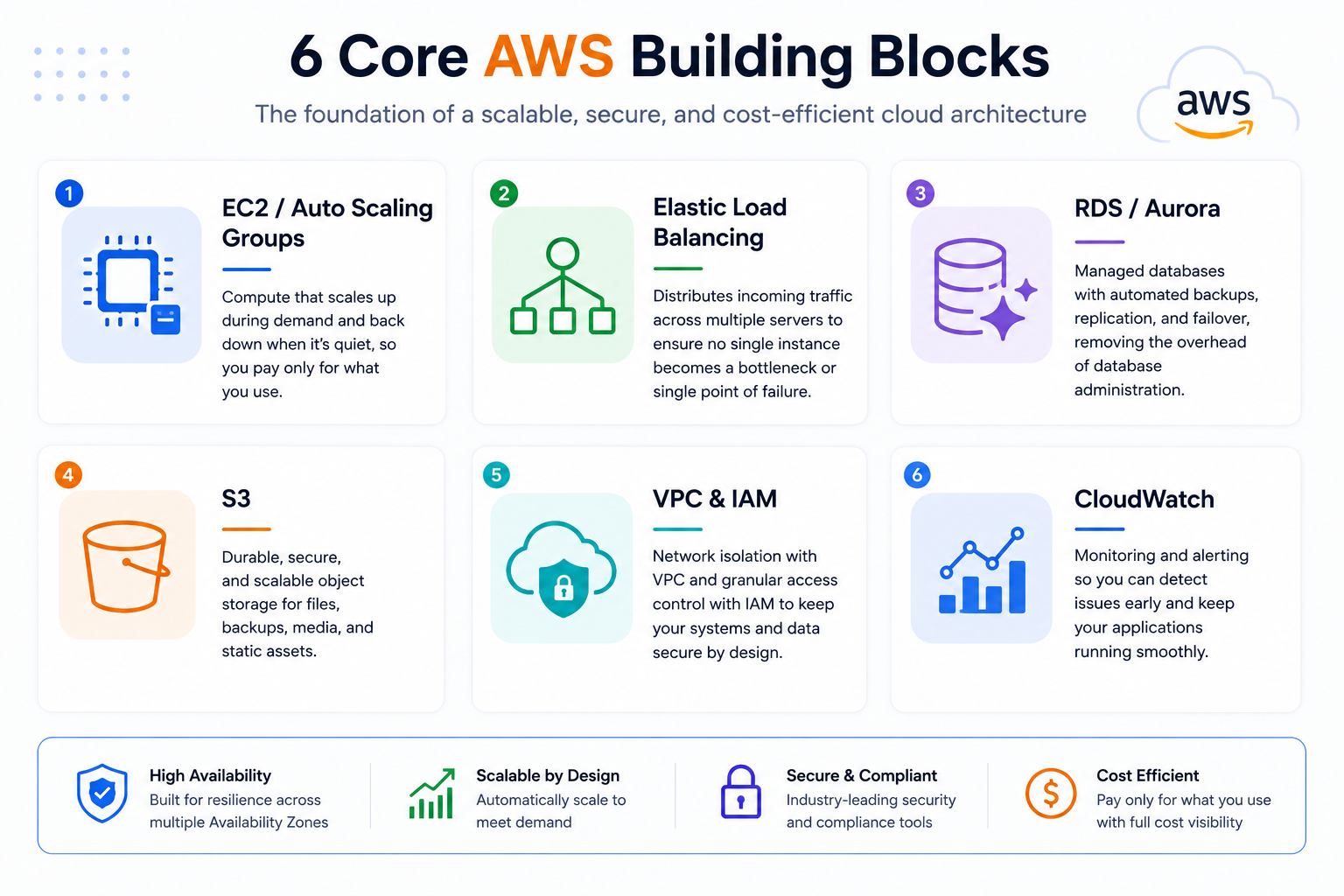
Core AWS Building Blocks for a Scalable Setup
EC2 / Auto Scaling Groups — compute that scales up during demand and back down when it's quiet, so you're not paying for idle capacity
Elastic Load Balancing — distributes traffic across multiple servers so no single instance becomes a bottleneck or single point of failure
RDS / Aurora — managed databases with automated backups, replication, and failover, removing manual database administration
S3 — durable, virtually unlimited object storage for files, backups, and static assets
VPC and IAM — network isolation and granular access control, so systems and data are only reachable by what actually needs them
CloudWatch — monitoring and alerting so issues are caught before customers notice them
The Real Cost of Getting This Wrong
Under-provisioned infrastructure fails at the worst possible moment — during a viral moment, a big product launch, or a seasonal sales spike, exactly when the outage costs the most in lost revenue and reputation.
Over-provisioned infrastructure has the opposite problem: businesses quietly overpay for capacity they don't use, often for years, simply because nobody audited the setup after initial launch.
The businesses that get this right treat infrastructure as something to be architected deliberately, then revisited periodically — not something to configure once during launch week and never touch again.
A Practical Migration and Scaling Roadmap
Audit your current setup. Understand what you're actually running, what it costs, and where the single points of failure are.
Right-size before you scale. Fix obvious inefficiencies (oversized instances, unused resources) before adding complexity.
Introduce redundancy incrementally. Load balancing and multi-availability-zone deployment are usually the highest-impact, lowest-disruption first steps.
Automate deployment and scaling. Manual server management doesn't scale with your team or your traffic — infrastructure-as-code and auto-scaling should replace it.
Set up real monitoring and alerting. You want to know about a problem before your customers do.
Revisit quarterly. Cloud costs and best practices shift; a setup that was optimal a year ago may not be optimal today.
How MegaMind Solutions Builds Cloud Infrastructure That Scales
We design and deploy AWS infrastructure that's built to handle real growth — not just today's traffic, but next year's. From initial architecture to full migrations of existing systems, we focus on reliability, security, and cost efficiency working together, not traded off against each other. See our AWS & Cloud services or book a call to get an honest read on your current setup.
Frequently Asked Questions
How do I know if my business needs to migrate to AWS? If you're experiencing unpredictable downtime, unclear hosting costs, or your engineering team is spending significant time on server maintenance instead of product work, it's worth a proper infrastructure audit.
Is AWS more expensive than traditional hosting? Not when architected correctly. AWS's pay-as-you-go model, combined with auto-scaling, often costs less than traditional hosting once you factor in the cost of over-provisioned servers sitting idle.
How long does an AWS migration take? This depends heavily on the complexity of the existing system, but a well-scoped migration for a mid-sized application typically takes a few weeks to a couple of months, done in phases to avoid downtime.
Do I need a dedicated DevOps team to use AWS effectively? Not necessarily. Many businesses work with an outside partner for architecture and initial setup, then rely on managed services and automation to reduce ongoing operational overhead.
