AI Automation for Business in 2026: How Smart Workflows Are Replacing Manual Processes

AI Automation for Business in 2026: How Smart Workflows Are Replacing Manual Processes
Two years ago, "AI automation" meant a chatbot on your website. In 2026, it means something much bigger: autonomous systems that read your emails, qualify your leads, update your CRM, generate reports, and hand off only the exceptions that actually need a human.
Industry research now puts overall AI adoption among organizations in the high 80% range, with a large share of enterprises reporting at least one AI system running in live production — not a pilot, not a proof of concept, but a real workflow doing real work every day. For small and mid-sized businesses, adoption has roughly doubled in the last two years, and the businesses moving early are opening a measurable gap over competitors still doing everything by hand.
If you're still copying data between spreadsheets, manually triaging support tickets, or building reports by hand every Monday morning, this guide is for you.
What "AI Automation" Actually Means in 2026
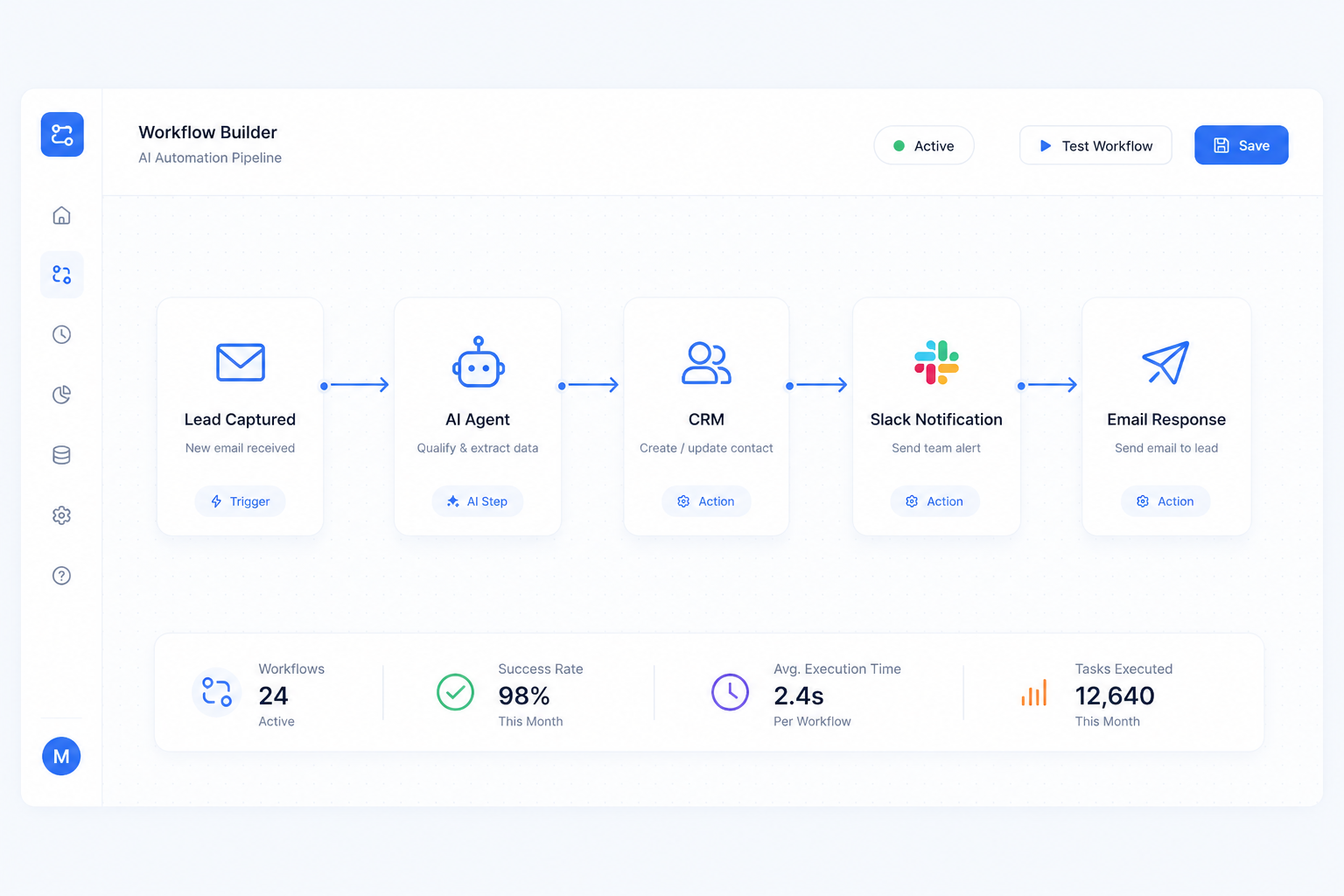
AI automation today combines three layers:
Traditional automation (n8n, Make, Zapier-style workflows): rule-based triggers that move data between apps reliably and cheaply.
AI agents (LangChain/LangGraph-style orchestration): systems that reason over unstructured input — emails, PDFs, voice calls — and make decisions, not just move data.
ML applications: models trained or fine-tuned on your own data to predict, classify, or recommend.
The businesses seeing the biggest returns aren't choosing one of these — they're combining all three into a single pipeline.
Where AI Automation Is Delivering the Clearest ROI
Not every department automates at the same speed. Based on current industry benchmarks, these are the areas where businesses are seeing the fastest, most measurable payback:
Customer service — the single fastest-adopting department, with AI now handling a meaningful share of routine interactions before a human ever gets involved, and reported gains in customer satisfaction scores where AI is deployed well.
IT operations — organizations using AI here report meaningfully fewer critical incidents and faster resolution times, because monitoring and triage happen continuously instead of during business hours only.
Sales and marketing — AI-qualified leads, automated follow-up sequences, and content generation are freeing up reps to spend time on conversations that actually close.
Back-office operations — invoice processing, data entry, scheduling, and reporting are increasingly running with little to no manual touch.
Businesses that adopt AI automation early are consistently reporting double-digit reductions in operational costs, alongside faster response times to customers.
Common Objections — And Why They Don't Hold Up Anymore
"AI automation is only for big companies with big budgets." Not anymore. Tools like n8n and Make.com have made workflow automation affordable for teams of any size, and off-the-shelf AI models mean you no longer need an in-house data science team to get started.
"Our processes are too custom to automate." This is the most common misconception. Custom doesn't mean un-automatable — it means the automation needs to be designed around your process instead of forced into a generic template. That's a scoping problem, not a technology limitation.
"We tried automation before and it broke everything." Most failed automation projects fail for the same reason: they were built without proper error handling, fallback logic, or human-in-the-loop checkpoints for edge cases. A well-architected workflow accounts for the 10% of cases that don't fit the happy path.
A Practical Roadmap to Automating Your Business
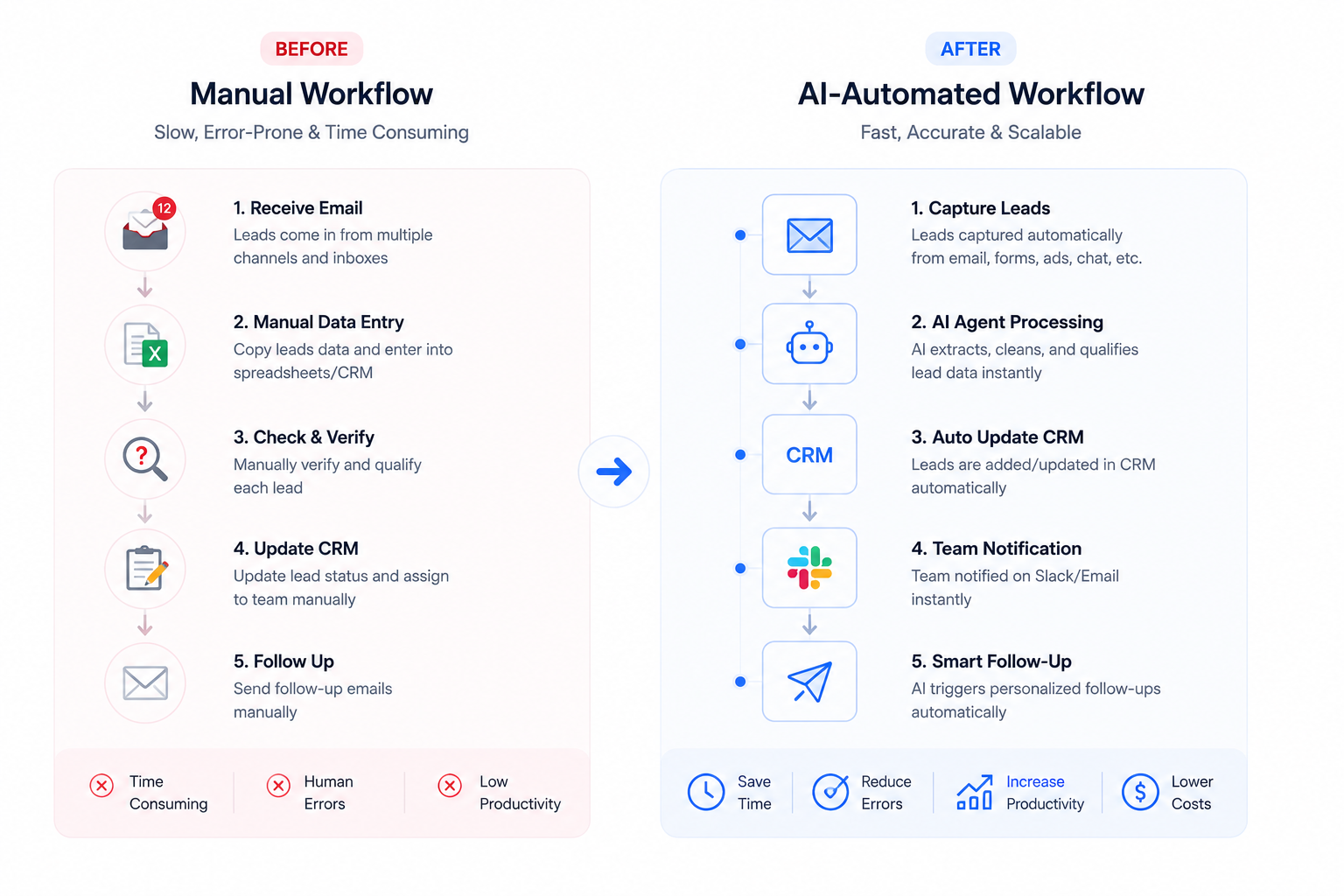
Map your highest-friction process. Pick the workflow your team complains about most — usually something repetitive, rule-based, and high-volume.
Separate the deterministic steps from the judgment calls. The deterministic parts (data entry, formatting, routing) are ready for straightforward automation. The judgment calls are where an AI agent adds real value.
Start with one workflow, not ten. A single, well-built automation that actually works will earn more trust — and more budget for phase two — than five half-finished ones.
Build in monitoring from day one. Every automation should log what it did, flag what it couldn't handle, and be reviewable by a human.
Expand deliberately. Once the first workflow is stable, use the same architecture pattern to automate the next process.
Why This Matters Now, Not Later
The gap between AI-native businesses and manual-process businesses is widening every quarter, not narrowing. Early movers aren't just saving money today — they're building institutional knowledge about how to run AI-augmented operations, which is becoming a genuine competitive moat.
How MegaMind Solutions Can Help
We design and build AI automation systems using n8n, Make.com, LangChain, and LangGraph — from single-workflow quick wins to full multi-agent systems that run your back office. If you're ready to stop doing repetitive work by hand, explore our AI & Automation services or book a 30-minute call to map out where automation would make the biggest difference in your business.
Frequently Asked Questions
How much does AI automation cost for a small business? Costs vary widely depending on complexity, but many businesses start with a single automated workflow for a few hundred to a few thousand dollars, then scale up as they see returns.
Do I need an AI strategy before I start automating? No — most successful automation programs start with one concrete, high-friction process rather than a company-wide strategy document. The strategy usually emerges after the first workflow proves itself.
What's the difference between automation and AI agents? Traditional automation follows fixed rules (if X happens, do Y). AI agents can interpret unstructured input and make judgment calls, which makes them suited to more complex, less predictable tasks.
How long does it take to build a business automation workflow? A focused, single-process automation can typically be designed, built, and tested within one to three weeks, depending on how many systems it needs to connect to.